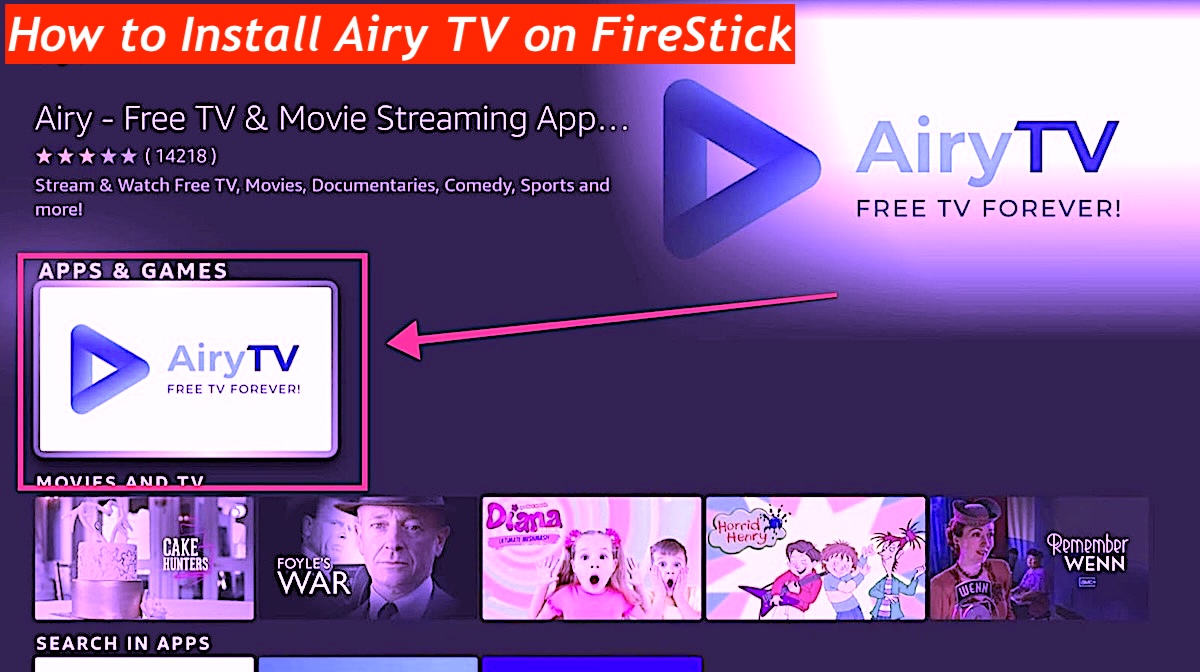
Install Airy TV on FireStick and iPhone: Look, I’ll be the first to admit that my FireStick is basically a permanent extension of my personality at this point, but even I get bored of the same three corporate streaming giants constantly demanding my monthly tribute. Enter Airy TV—a weirdly charming, totally free underdog that’s packed with over 100 live channels and a library of random nostalgia that feels like finding a hidden treasure chest in a dusty attic.
Airy TV 2026
Whether you’re rocking a Fire TV Stick Lite or the fancy 4K Max (congrats on the upgrade, by the way), or even if you’re just squinting at your iPhone during a lunch break, getting this set up is a total breeze. It’s honestly refreshing to find a service that doesn’t feel like a soulless algorithm; it’s got that raw, “something for everyone” energy that makes surfing through its sound library feel like a genuine adventure rather than a chore. If you’re tired of the same old Netflix scroll and want to inject some actual variety into your screen time without opening your wallet, sticking this app on your devices is a absolute no-brainer.
How to Install CrewNique Kodi Build
Why Is Airy TV So Popular?
Before we start pressing buttons and pretending to be hackers, let’s just acknowledge that Airy TV is shockingly versatile, running on pretty much anything with a pulse—from your iPhone and Android gadgets to the heavy-duty NVIDIA SHIELD Pro or even that humble Mi Box S you probably forgot you owned. It’s completely free with absolutely no signup required, which is a rare unicorn in this subscription-obsessed world, though the trade-off is, inevitably, the ads.
Look, nobody loves interruptions, and yeah, they can be a total buzzkill, but they’re the necessary evil that keeps the lights on, allowing us to binge weird movies and live channels without dropping a single cent. It’s a raw, imperfect exchange that’s honestly worth making, so if you can stomach the occasional interruption for the sake of free entertainment, let’s get on with this guide and get your FireStick and iPhone sorted.
How to Install Airy TV on FireStick 2026
- One of the best things about this setup is that you don’t have to deal with the headache of sideloading shady files because Airy TV is sitting right there in the official Amazon App Store.
- Head over to the home screen and hover over the “Find” icon to pull up the search bar, because apparently, we still have to type things out in 2026.
- Start chicken-pecking “Airy TV” into that virtual keyboard until the name pops up in the list below like it’s been waiting for you.
- Spot that blue triangle logo—honestly, it’s hard to miss—and give it a satisfying click to get things moving.
- Click that “Download” or “Get” button and maybe take a quick sip of coffee while the FireStick does the heavy lifting for a minute.
- Once the progress bar finally finishes its little dance, just fire the app open and dive straight into the chaos of free streaming.
It’s pretty much the easiest win you’ll get all day, honestly.
Best Free Official Amazon Store Apps
How To set up ExpressVPN
- Step 1: Subscribe to ExpressVPN. It comes with a 30-day money-back guarantee, so you can try it risk-free.
- Step 2: Power on your FireStick and go to Find > Search.
- Step 3: Type ExpressVPN (without quotes) in the search field and select it when it appears in the results.
- Step 4: Click Download to install the ExpressVPN app.
- Step 5: Open ExpressVPN, log in with the credentials you created during signup, and click Sign In.
- Step 6: Tap the Power icon to connect to a VPN server. Your connection is now secure and private with the fastest VPN available for FireStick.
How to Watch Airy TV on FireStick
Actually getting into the app is mercifully simple, so just mash down that Home button on the remote until the shortcut menu pops up like a digital genie. Tap into the Apps section, hunt down Airy TV in the crowd, and give it a launch; it’ll dump you right onto a home screen filled with featured channels that’s honestly more intuitive than most of the over-engineered junk out there. Navigation is pretty much a “set it and forget it” situation—no complex manuals needed—so just find something that looks remotely interesting and hit Play to go full-screen. It’s a wonderfully low-effort way to get lost in some niche content without the usual tech-induced headache. Once the stream starts, it’s just pure, unadulterated free television.
Stream Airy TV on FireStick
Look, navigating Airy TV is pretty much a breeze once you stop staring at the home screen and actually hit that sidebar on the left. Honestly, it’s a bit of a rabbit hole—you’ve got everything from those grainy Classic Movies that make me feel way older than I am to Reality TV that is total junk food for the brain, plus the usual suspects like Sports, Thrillers, and some surprisingly decent Food & Travel stuff.
If the app’s “modern” vibe feels a little too polished or just plain annoying, you can actually go full retro by diving into the Options menu to Change Theme; it’ll pop up a choice between the sleek current look and the classic skin. Personally, I’m a sucker for that old-school aesthetic because the new one feels like it’s trying way too hard, but hey, you do you. It’s a simple tweak that makes the whole binge-watching session feel a lot more personal and a lot less like scrolling through a generic corporate template.
How to Install Airy TV 2026 on iPhone
Airy TV is available for download from the Apple App Store as well as the Google Play Store. Here’s how to install it on an iPhone:
- Open the App Store on your iPhone.
- Tap Search at the bottom right and type Airy TV into the search bar.
- From the results, select Airy TV. Tap the Get button, authenticate if prompted, and wait for the app to download.
- Once installed, you can open Airy TV directly from the App Store or find its icon on your iPhone’s home screen. When you launch the app for the first time, it will ask you to choose your preferred theme.
Airy TV Features For Channels
If you’re still paying a small fortune for cable while owning a FireStick or an Nvidia Shield, you’re doing it wrong; Airy TV is this weirdly brilliant, totally free gem that feels like stumbling onto a secret stash of over 100 channels. It’s pretty much everywhere—Android TV, iPhones, you name it
And while the interface isn’t winning any beauty pageants, the sheer variety of genres is honestly kind of impressive for something that costs zero dollars. It’s the perfect “nothing’s on” solution for when you just want to flip through random shows without the soul-crushing commitment of a subscription.
Seeing a massive list of channels pop up on a basic Android box feels like a minor tech victory, even if half the fun is just discovering what kind of bizarre, niche content they’ve tucked away in there. This isn’t some high-end, polished corporate platform, but that’s exactly why it works—it’s raw, slightly chaotic, and surprisingly reliable for a weekend binge.
Featured Channels
- Oktoberfest
- Creepfest
- Fright Night
- Conspiracy
- Horror TV
Classic Movie Channels
- Godzilla TV
- Monsters & Aliens
- Kung Fu Movies
- Screen Sirens
- Blaxploitation
The Classic TV
- The Greatest American Hero
- Gimme a Break! TV
- Midsomer Murders
- Highlander
- Doctor Who TV
- McHale’s Navy TV
- Dragnet TV
- Bob Newhart
- The Rifleman
- Hogan’s Heroes TV
- Degrassi TV
- Gomer Pyle TV
- Dukes of Hazard
- My Three Sons TV
- Rockford Files TV
Classic Kids
- 90s Cartoons
- 80s Cartoons
- 70s Cartoons
- Classic Cartoons
Reality
- TLC
- Kitchen Nightmares
- Judge TV
- Reality Pleasure
- OMG Network
- Conspiracy
- Hoarders TV
- Hell’s Kitchen
Comedy
- Comedy Central
- Comedy Club
- Just For Laughs
- Shade Room
- British Comedy
Sports
- WWE
- Rugby
- Tennis
- Table Tennis
- Beach Volleyball
- Golf
- Floorball
- Ultimate Frisbee
- Gymnastics
- Curling
- CrossFit Games
- Climbing
Music
- Code Music
- Music Videos
- Vintage Radio
For more detailed information on categories and channels, visit the official Airy TV website.
Installing Airy TV APK 2026
Look, I’ve spent way too much time trying to avoid monthly cable bills, and honestly, grabbing the Airy TV APK is probably the smartest low-effort move you can make in 2026. It’s not exactly rocket science, but if you’re like me and usually forget where the “allow unknown sources” button is hidden, this quick breakdown should save you a headache.
How To Download Airy TV APK 2026
- Grab the “Downloader” app from your device’s official store first, because trying to use a basic TV browser to find a clean APK is a total nightmare I wouldn’t wish on anyone.
- Head into your security settings and toggle on the “Install Unknown Apps” permission for Downloader; it feels a bit rebellious, but it’s the only way to get the good stuff that isn’t gatekept by big corporations.
- Type the actual URL for the Airy TV APK into the search bar—make sure you’re getting the 2026 version because the older ones have this annoying habit of crashing right when a show gets good.
- Once that file finishes downloading, just hit install and ignore the scary-sounding system warnings; it’s just the device being overprotective of its boring default apps.
- Launch the app, pick your theme (I’m still team Classic for that nostalgic vibe), and you’re basically set to binge-watch a hundred channels for the grand total of zero dollars.
- If it doesn’t work on the first try, don’t panic—usually a quick restart fixes whatever ghost is in the machine, and then you’re free from the tyranny of high-priced streaming.
Final Thoughts
We’re all getting absolutely bleed dry by these endless streaming subscriptions, and honestly, it’s refreshing to find something like Airy TV that doesn’t ask for a credit card just to watch a decent movie. Whether you’re tossing it on a FireStick or just scrolling on an iPhone during a boring commute, having access to hundreds of live channels for free feels like a small act of rebellion against the big-name platforms.
It isn’t always the prettiest interface—actually, it’s a bit clunky if we’re being real—but the sheer volume of shows and random films available makes it a total lifesaver for anyone trying to cut back on monthly bills. There’s a certain nerdy satisfaction in bypasssing the paywalls and just getting straight to the content without the soul-crushing guilt of another twenty-dollar charge hitting the bank account. It’s simple, slightly raw, and exactly the kind of no-nonsense setup that makes ditching the high-priced stuff feel like a genius move.