Install Nova TV APK on FireStick: This guide walks you through getting Nova TV up and running on a FireStick, but it’s not picky—it also works on Fire TV Cube, Fire Stick 4K, FireStick 4K Max, and even Android devices like boxes or smart TVs. Basically, if it streams, Nova TV probably plays nice with it.
Best Free Sports Streaming Sites
What is Nova TV?
Look, if you’re tired of scrolling through empty libraries, Nova TV APK is honestly a lifesaver for hunting down movies and shows without the usual headache. The interface doesn’t feel like a cluttered basement for once; it’s actually clean enough that even a low-spec FireStick handles it like a champ, though—full disclosure—it might hiccup or lag for a second if you push it too hard. It’s got that raw, “set it and forget it” vibe where the content stays fresh, making those late-night binge sessions feel effortless rather than a tech support nightmare. Sure, it isn’t flawless, but for a lightweight app that just gets the job done, it’s pretty much a nerd’s dream for snagging high-quality streams on a budget.
Honestly, it’s just refreshing to find something that doesn’t overcomplicate the simple joy of veg-ing out on the couch. Nova TV pulls free streaming links from all over, giving access to a ton of movies and shows without hunting around. For a smoother, faster experience, pairing it with Real Debrid is a game-changer, and logging in with Trakt keeps your watchlist and history in sync so nothing gets lost. It’s easily one of the top third-party streaming apps for FireStick, but heads-up—it needs an external media player called BPlayer, which will be covered later in the guide.
Is Nova TV Safe and Legal?
A quick scan of the Nova TV APK came back clean—no malware, no weird surprises—so it seems safe enough to use. Millions are streaming it worldwide, but keep in mind it might not be completely legal everywhere, and there’s no guarantee it has every content license sorted. Copyright infringement? Definitely not endorsed. To keep your activity private and avoid unwanted eyes, a VPN is a solid move. On all devices, ExpressVPN quietly handles that, encrypting data and letting binge sessions stay exactly what they should be—stress-free, private, and uninterrupted.
Features of the Nova TV FireStick App
Here are some of the key features that make Nova TV stand out:
- A huge stash of movies and TV shows—enough to make procrastination an art form or fuel a full-on binge weekend.
- Interface is clean, simple, and doesn’t make you want to throw the remote across the room.
- Plays nicely with premium services like Real-Debrid and Premiumize, so buffering becomes a thing of the past.
- Trakt integration keeps watchlists and viewing history in sync—great for the organized (or obsessive) type.
- Browse by categories or genres right from the home screen—no endless scrolling through menus.
- Streams in high-definition because squinting at pixelated faces is the ultimate buzzkill.
How to Install Nova TV APK on FireStick 2026
- FireStick plays nice with third-party apps, just not right out of the box—there’s a tiny wall first, and stepping over it is part of the ritual.
- Start by toggling Apps from Unknown Sources in the security settings, the digital equivalent of saying “yeah, this’ll be fine.”
- A sideloading app is non-negotiable here, and Downloader is the reliable workhorse that doesn’t complain or overcomplicate things.
- From the home screen, hit Search, type Downloader, select it, and install—basic, painless, almost suspiciously smooth.
- Jump back to Settings > My Fire TV > Developer Options; if it’s missing, tap About > Fire TV Stick seven times like unlocking a cheat code.
- Open Install Unknown Apps (or Apps from Unknown Sources, depending on the mood of the device) and enable Downloader.
- Head home, open Apps, launch Downloader, and consider pinning it—future you will appreciate the laziness.
- Clear the pop-ups, click the URL bar, type novatvapk.com, and press GO like it’s second nature.
- On the Nova TV page, hit Download APK and wait a few seconds while the file quietly does its thing.
- Select Install, pause briefly, and let FireStick pretend it’s working very hard.
- Choose OPEN to dive in immediately or DONE to clean up first—either works, no judgment.
- If prompted, delete the APK file afterward; storage space disappears faster than expected.
- Wrap it up by installing BPlayer from the recommended source, because Nova TV refuses to cooperate with anything else and isn’t shy about it.
How to Stream on FireStick with a VPN
Before you start streaming In Firestick, I would like to warn you that everything you stream on firestick is visible to your ISP and Government. This means, streaming copyrighted content (free movies, TV shows, live TV, and Sports) might get you into legal trouble.
Thankfully, there is a foolproof way to keep all your streaming activities hidden from your ISP and the Government. All you need is a good VPN for FireStick Streaming. A VPN will mask your original IP which is detecting… and will help you bypass Online Surveillance, ISP throttling, and content geo-restrictions.
I personally use and recommend ExpressVPN, which is the fastest and most secure VPN. It is compatible with all kinds of streaming apps and devices.
NOTE: We do not encourage the violation of copyright laws. But, what if you end up streaming content from an illegitimate source unintentionally? It is not always easy to tell the difference between a legit and illegal source.
So, before you start streaming on FireStick, here's how to get VPN protection in 3 simple steps.
-
Step 1 Get the ExpressVPN subscription
Get it HERE. It comes with a 30-day money-back guarantee. Meaning, you can use it free for the first 30-days and if you are not satisfied, you can ask for a full refund.
-
Step 2 Download and install the ExpressVPN app
Click HERE to download and install the app on your streaming device. If you are using a FireStick, I have given the exact steps starting with Step 4 below.
-
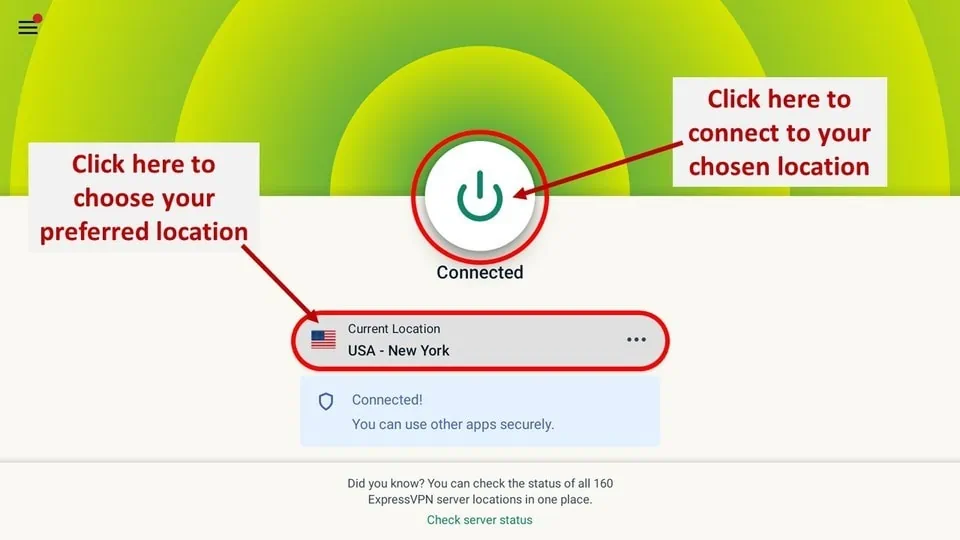
Step 3 Click the Power icon to connect
Your connection is now secure with the fastest and best VPN for FireStick.
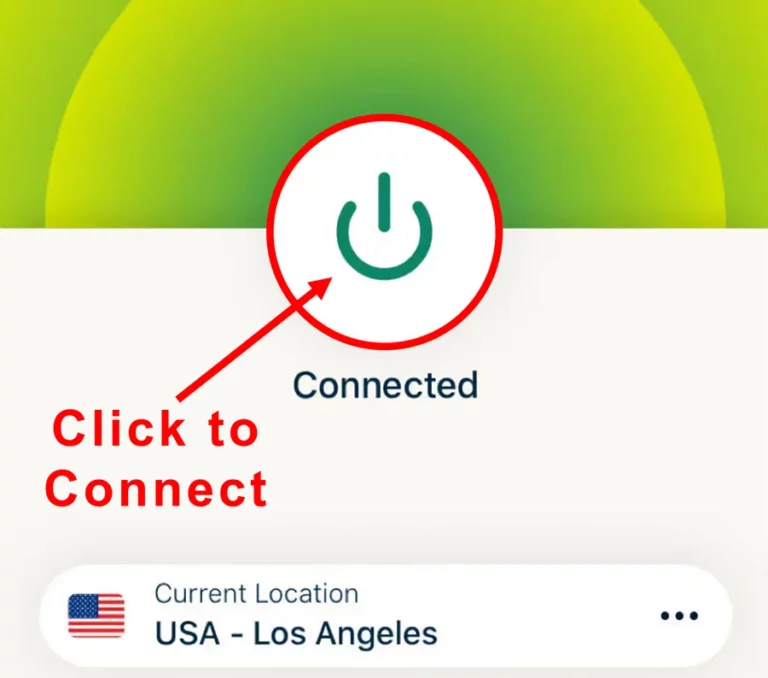
The following are the steps to install ExpressVPN VPN on your Fire TV devices. If you have other streaming devices, follow Step 1-3 above.
-
Step 4 Subscribe to ExpressVPN
Subscribe HERE (if not subscribed already).
-
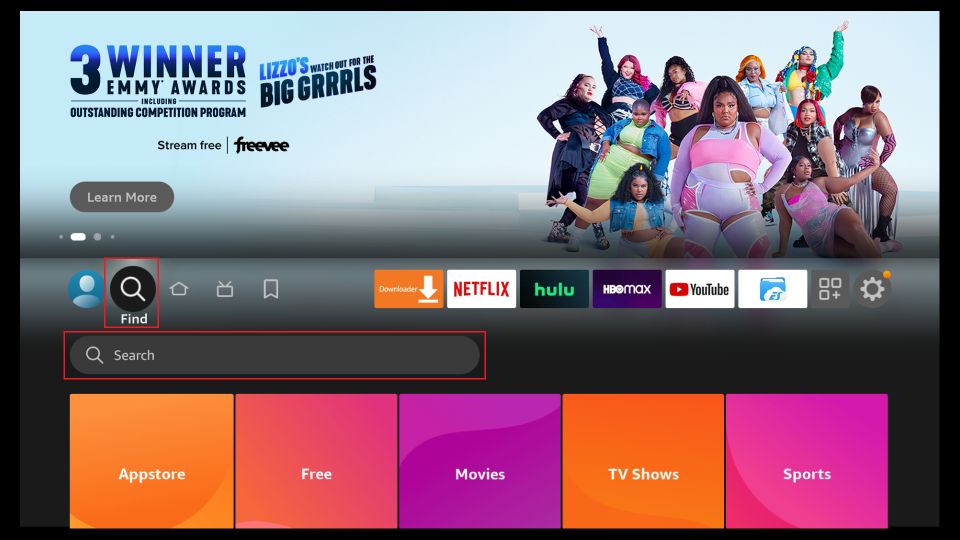
Step 5 Go to Fire TV Stick home screen.
Click Find followed by Search option (see image below).
-
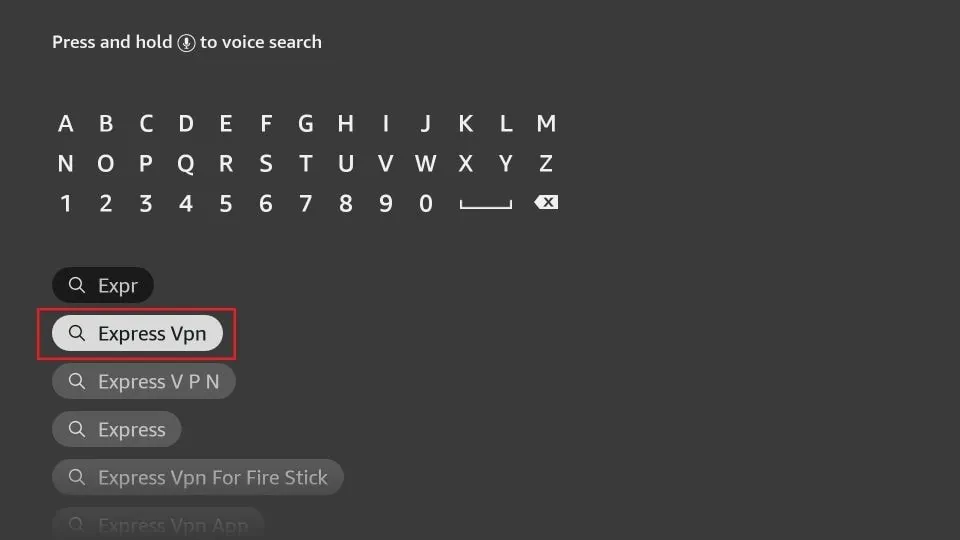
Step 6 Type Expressvpn in the search bar and select when it shows up
-
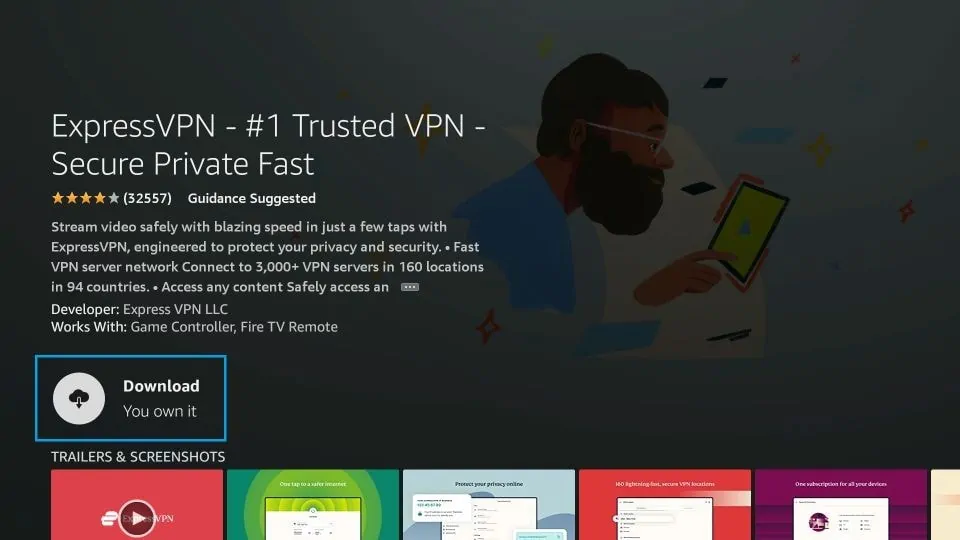
Step 7 Click Download
-
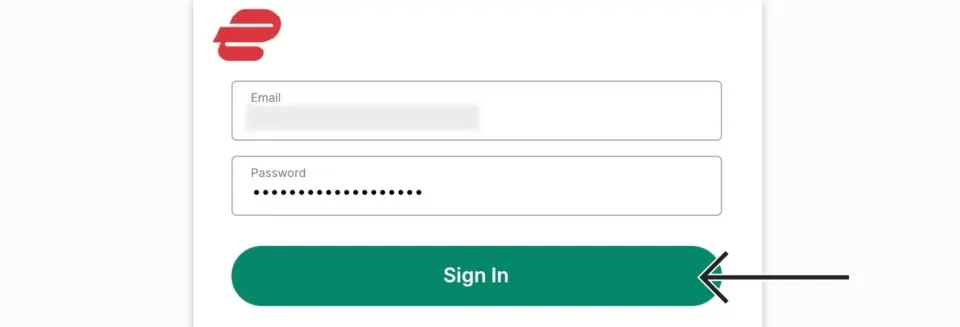
Step 8 Open the ExpressVPN app
Sign in using the email ID and password that you created while buying the ExpressVPN subscription.
-
Step 9 Click the Power icon to connect to a VPN server.
That’s all. Your FireStick is now secured with the fastest VPN.
For more details, you can check our full guide on using ExpressVPN with FireStick.
How to Use Nova TV on FireStick
Nova TV may not appear on your home screen immediately after installation. Here’s how to access it easily and create a shortcut:
- Press and hold the Home button on the FireStick remote until that little menu pops up—yes, the one that feels like it’s hiding something useful. Then hit Apps.
- Or, if menus aren’t your thing, just go straight from the home screen and click the Apps icon—it’s in the middle row, all the way to the right.
- Scroll through your apps until you spot Nova TV, then click it to launch. Sometimes it feels like finding a secret doorway, but trust me, it works.
Exploring Nova TV on FireStick
When you open Nova TV for the first time, you’ll see a few prompts:
- Click Allow when asked for permissions.
- Choose a subtitle language or press the Back button to skip.
- Click OK on the disclaimer prompt.
Once you’re past the setup, the Nova TV main interface will load. By default, the app displays TV shows on the home screen. Unlike many apps, Nova TV features a top-row category menu (e.g., Action & Adventure, Comedy, Crime, Documentary, etc.).
To access the Movies section:
-
Click the menu icon (three horizontal lines) in the upper-left corner and select Movies.
To open Settings:
-
Click the menu icon again and select the gear icon from the sidebar.
In the Settings menu, you can:
- Change the default tab to Movies if you prefer movies on the home screen.
- Select your preferred default playback option.
- Log in with services like Real Debrid, Premiumize, All Debrid, or Trakt for a better streaming experience
Best Nova TV Alternatives 2026
- Best Kodi Live Sports Addons 2026
- CrewNique Kodi Build 2026
- Fox Sports Kodi Addon
- Hard Nox Kodi Build
- Kodi Karaoke
- Wrestlers Kodi Addon
Wrapping Up
Getting Nova TV on a FireStick is way easier than it sounds, and honestly, it’s kind of addictive once it’s running. It’s lightweight, doesn’t eat up your device, and suddenly your couch turns into a tiny cinema with free movies and shows everywhere. Toss in Real-Debrid and Trakt, and suddenly streams are silky smooth, and your watchlist actually makes sense. This app has this sneaky, time-sucking way of grabbing you—one minute it’s a casual scroll, the next you’re lost in shows you didn’t even know existed. Just messing around with menus and random buttons somehow leads to the best finds, the kind that make you go, “Wait, how did I even stumble on this?